


For Families

Someone on their side. Their money, their decisions.

We set up safeguards with your parent and call when something looks wrong. You help, with their permission.

Scams change. So do we. As we learn about new scams, we build what we learn into every plan.

A lighthouse on a rocky cliff shining its beam over a stormy sea at night

We help your family spot scams together. Safeguards on accounts, a call when it matters.

Why scams work

Scammers don't need a password. They need your parent to believe them.

Most money lost by people 60 and over isn't stolen with a password. Someone talks them into sending it.

$7.7 billion

Reported lost to fraud by people 60 and over in 2025.

$38,500

Average reported loss per person.

The FTC estimates the true cost could be as high as $81.5 billion in 2024.

Four of the top five scams work by persuasion.

  1. 1.Investment scams$3.52 billion
  2. 2.Tech and customer support scams$1.04 billion
  3. 3.Romance and confidence scams$584 million
  4. 4.Government impersonation$413 million

Together, about 72% of reported losses for people 60 and over (our calculation).

Sources: FBI and FTCShow detailsHide details

$7.7 billion, $38,500 and the scam types: FBI Internet Crime Complaint Center (IC3), 2025 Internet Crime Report(opens in a new tab), Elder Fraud section (complaints from people 60 and over). The 72% share is our calculation from those figures.

The $81.5 billion estimate is not from the FBI. It comes from the Federal Trade Commission, Protecting Older Consumers 2024–2025(opens in a new tab) (December 2025). The FTC puts the total cost of fraud to people 60 and over in 2024 at $10.1 billion to $81.5 billion, depending on how it is counted.

The steps

Six simple steps, at your parent's pace.

  1. Referral or waitlist. Their advisor refers them, or you sign up.

  2. Private conversation. How they bank, and who they trust.

  3. Personal setup. Safeguards, by phone or video.

  4. Trusted Contacts. Someone their bank can call.

  5. Ongoing support. We call when something looks wrong.

  6. If fraud happens. Our written playbook, and recovery help on Advantage and Signature.

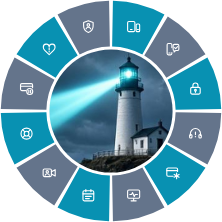
The Senior-Secure 12 pillars of protection

Each plan builds on the one before it.

Senior-Secure™ badge: a lighthouse ringed by icons for the 12 pillars of protection listed below.
12 pillars, one team.

Essentials

5 of 12 pillars

Core protections in every plan:

  1. Call and text screeningWe set up their phone to block known scam calls and texts. If one still gets through, they can forward it to us and we'll tell them whether it's safe.
  2. Secure vault and loginsWe help them set up a digital vault for their passwords and important documents. It's theirs, and we never see their passwords.
  3. Protection from fake tech supportWe help them check any call, pop-up or message that claims to be tech support.
  4. Credit freeze and opt-out helpWe help them freeze their credit at the three credit bureaus, and save each bank's fraud number. Together, we add their numbers to the National Do Not Call Registry, opt them out of pre-approved credit offers and sign them up to cut down on junk mail.
  5. Breach alerts and password helpIf their personal information shows up in a data breach, we let them know and help them change the affected passwords.

Remote setup by phone or video

Pricing coming soon

Advantage

Recommended

9 of 12 pillars

Everything in Essentials

  1. Call and text screeningWe set up their phone to block known scam calls and texts. If one still gets through, they can forward it to us and we'll tell them whether it's safe.
  2. Secure vault and loginsWe help them set up a digital vault for their passwords and important documents. It's theirs, and we never see their passwords.
  3. Protection from fake tech supportWe help them check any call, pop-up or message that claims to be tech support.
  4. Credit freeze and opt-out helpWe help them freeze their credit at the three credit bureaus, and save each bank's fraud number. Together, we add their numbers to the National Do Not Call Registry, opt them out of pre-approved credit offers and sign them up to cut down on junk mail.
  5. Breach alerts and password helpIf their personal information shows up in a data breach, we let them know and help them change the affected passwords.

Advantage adds

  1. Two-device setupWe send them a second device just for banking and investing. Their own phone and computer stay the same for everything else, so a bad link or a fake pop-up there stays away from their money. We set it up with them by phone or video.
  2. Monthly family summaryWith their permission, a family member they choose gets a short summary each month.
  3. Recovery helpIf a scam gets through, we help them take the next steps right away: calling their bank, filing reports with the FTC and local police, changing passwords and watching their accounts for follow-up scams.
  4. Fast help locking a card or accountIf something looks wrong, we join them on a three-way call with their bank right away to lock the card or account.

Remote setup by phone or video

Pricing coming soon

Signature

12 of 12 pillars

Everything in Advantage

  1. Call and text screeningWe set up their phone to block known scam calls and texts. If one still gets through, they can forward it to us and we'll tell them whether it's safe.
  2. Secure vault and loginsWe help them set up a digital vault for their passwords and important documents. It's theirs, and we never see their passwords.
  3. Protection from fake tech supportWe help them check any call, pop-up or message that claims to be tech support.
  4. Credit freeze and opt-out helpWe help them freeze their credit at the three credit bureaus, and save each bank's fraud number. Together, we add their numbers to the National Do Not Call Registry, opt them out of pre-approved credit offers and sign them up to cut down on junk mail.
  5. Breach alerts and password helpIf their personal information shows up in a data breach, we let them know and help them change the affected passwords.
  6. Two-device setupWe send them a second device just for banking and investing. Their own phone and computer stay the same for everything else, so a bad link or a fake pop-up there stays away from their money. We set it up with them by phone or video.
  7. Monthly family summaryWith their permission, a family member they choose gets a short summary each month.
  8. Recovery helpIf a scam gets through, we help them take the next steps right away: calling their bank, filing reports with the FTC and local police, changing passwords and watching their accounts for follow-up scams.
  9. Fast help locking a card or accountIf something looks wrong, we join them on a three-way call with their bank right away to lock the card or account.

Signature adds

  1. Video call before big money movesBefore a large payment or any big account change, someone from our team looks it over with them on a video call.
  2. When a new love asks for moneyRomance scams build trust first, then ask for money. If a payment to someone new looks off, we call right away. In our check-ins, we also listen for early warning signs.
  3. If someone close takes advantageHelp when someone they trust misuses access.

Remote setup by phone or video, plus up to $100 a year toward in‑home help

Pricing coming soon

Included in every plan:

Scams change. So do we.

Senior-Secure™ keeps studying new scams and uses what it learns to protect your family better.

Newest:

Fake health plan ads during open enrollment

See the latest scams

Your part as family

You can help, and your parent stays in charge.

  • Join setup calls.
  • Get a monthly summary, if they choose (Advantage and Signature).
  • Hear from us when something looks wrong.
An adult son and daughter stand with their mother outdoors.
Join the waitlist

Tell us about your family

Please make sure your parent knows and agrees. They're always our client.

Join the waitlist as family

Is your parent signing up? Start here

Why Senior-Secure? Read our story.